Ganttly: Gantt Chart Planner

Ganttly: Gantt Chart Planner Summary
Ganttly: Gantt Chart Planner is a free, with in-app purchases iOS app in Productivity by Dao Nguyen. Released in Aug 2025 (1 year ago). It has 5.00 ratings with a 4.80★ (excellent) average. Based on AppGoblin estimates, it reaches roughly 29 monthly active users and generates around $<10K monthly revenue (100% IAP / 0% ads). Store last updated Aug 22, 2026
Ganttly: Gantt Chart Planner SDKs Summary
App not yet scanned for SDKs.
4.8★
Ratings: 5.00
Screenshots



App Description
A minimalist project planner for your personal plans, Ganttly turns projects and to-do lists into clear, beautiful task-duration timelines. See what’s happening now, what comes next, and how everything fits together across days, weeks, months, or years.
No Sign-Up Required
No Ads
No Tracking or Analytics
Private by Design
Traditional project management software is often complicated, cluttered, and built for corporate teams. Planning your own projects (from a weekend DIY to your dream wedding) should feel inspiring, not intimidating. Ganttly trades complexity for clarity, giving you powerful visual planning tools without the corporate-software feel.
TASK DURATIONS, VISUALIZED
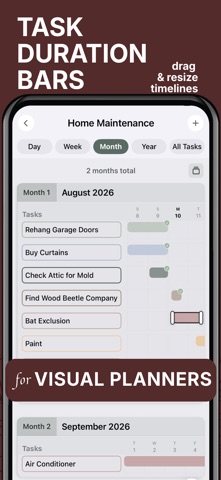
Turn ordinary tasks into visual duration bars so you can understand your plan at a glance. See when each task starts, how long it lasts, where tasks overlap, and what’s coming next.
EDIT DIRECTLY ON THE TIMELINE
Plans change. Ganttly makes adjusting them easy. Select a task bar, drag it to a new date or time, or resize its duration directly on the timeline. Your plan stays flexible without forcing you through complicated menus.
PLAN ACROSS DAYS, WEEKS, MONTHS & YEARS
Zoom in for detailed daily planning or step back to see the bigger picture. Day, Week, Month, Year, and All Tasks views help you understand both short-term details and long-term progress.
SUBTASKS & PROGRESS
Break larger tasks into manageable subtasks and track completion as you go. Progress percentages and clear completion indicators make it easy to see what’s finished and what still needs attention.
RECURRING PROJECTS
Some plans happen more than once. Restart completed recurring projects while preserving the structure and spacing of your original timeline.
COLLABORATE TOGETHER
Share projects with other people and choose whether they can view or edit. Changes stay synced through Apple iCloud so everyone can keep working from the same project timeline.
HOME SCREEN WIDGETS
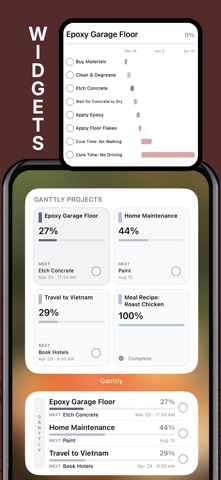
Keep your projects visible without opening the app. See what’s next, track progress, view mini Gantt timelines, and complete tasks directly from interactive Home Screen widgets.
CURATED COLOR THEMES
Not a designer? No problem. Choose from thoughtfully curated color palettes to give your projects a beautiful, cohesive look. Use color to group related tasks and make complex plans easier to understand in an instant.
NEVER MISS A START DATE
O