PDF Editor: PDF Fill & Sign

PDF Editor: PDF Fill & Sign Summary
PDF Editor: PDF Fill & Sign is a free, ad-supported, with in-app purchases Android app in Productivity by TrustedOffice. Released in Jul 2021 (5 years ago). Store last updated Aug 23, 2025
SDK intelligence: AppGoblin detected 9 ad networks(e.g. ironSource), 3 development tools, 1 analytics: product, 1 analytics: attribution,and 1 business tools integrated into PDF Editor: PDF Fill & Sign. View full SDK list →
PDF Editor: PDF Fill & Sign SDKs Summary
PDF Editor: PDF Fill & Sign was last scanned for SDKs on 2024-09-28. Below is the overview of third-party companies detected in the app. The full list of SDKs, permissions and unknowns is available here.
AppGoblin saw PDF Editor: PDF Fill & Sign uses 9 Ad Networks
 ironSource
 BIGO Ads
 Vungle
 Mintegral
AppGoblin saw PDF Editor: PDF Fill & Sign uses 1 Analytics: Product
 Firebase
AppGoblin saw PDF Editor: PDF Fill & Sign uses 3 Development Tools
 Unity
Unity Google
 Square
AppGoblin saw PDF Editor: PDF Fill & Sign uses 1 Analytics: Attribution
 Adjust
AppGoblin saw PDF Editor: PDF Fill & Sign uses 1 Business Tools
 JourneyApps
0★
Ratings:
Screenshots


App Description
PDF reader and editor app to sign documents, edit PDF. Easy PDF fill and sign.
📚 PDF Editor: PDF Fill And Sign - versatile and power PDF editing app❗️❗️
📷 Document Scanner: Powerful and Fast Scanner
You are looking for an PDF expert application to help you:
✅ Scan photos, scan PDF, scan ID cards quickly
✅ PDF reader, PDF opener and viewer
✅ Ebook reader
✅ PDF editor, document editor: easy to edit PDF files
✅ PDF writer: Draw and write on PDF files
✅ PDF fill and sign: sign documents PDF
✅ Electronic signature maker
✅ PDF Scanner: Convert photos to PDF
Congrats, this PDF Editor: PDF Fill And Sign app is your perfect choice!. Not only a PDF reader PDF filler application, this is also a smart document editor tool to support your work and study. The document signer app integrates all powerful PDF editing features. Just select the PDF file, then open PDF and edit PDF however you want. All PDF edit signing operations are so easy and convenient!
Main features of the PDF signer app:
⭐PDF scanner, document scanner
- Document scanning feature: scan photos, take pictures with precision, ensure high quality scanned documents. Scan tags, scan PDFs, scan documents quickly with a few simple taps and convert to PDF files, making it easy to share and store your files.
- Convert images to PDF
- Select images from the gallery or scan all kinds of documents with your camera and convert to PDF file.
- Resize, crop and rotate images as you want. Quality optimization, scans for high quality PDF output
⭐ PDF editor, file editor
- PDF writer and editor: write on PDF files, write on documents
- Multi PDF editing tools: bookmarks file, PDF notes, edit PDF text, add photos, PDF signature, certificates...
- Fill PDF, save and submit PDF forms
- Digital signature maker, signature creator app for scanner signature
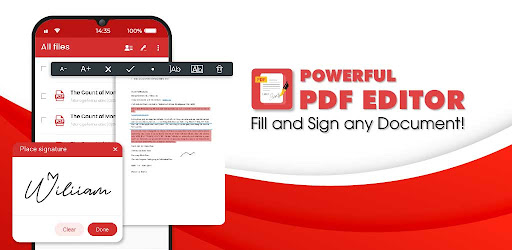
- Sign PDF: sign documents with your saved digital signature or you can simply draw a signature on the document
⭐ PDF reader, PDF viewer
- Open and quickly view PDF documents.
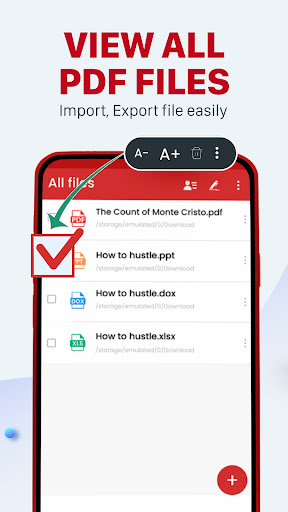
- Show list of PDF files, easy PDF reader
- Find PDF document with a simple search option.
- Zoom in and out of PDF files.
- Bookmark PDF for easy review
- Scroll PDF documents page by page
- Rename, bookmark file
- Sign and fill PDF files, fill out PDF
⭐E- signature & Form filler
- Draw, or import your signature. E- sign documents using your fin